


Paystub Generator: Paycheck
4.0681.00 Reviews
App Specs
- Version
- 10.0.28
- Updated On
- License
- Free
- Downloads
- 100,000+
- Developer
- Paystubx
- Categories
- Finance
- Platform
- Android
Screenshots

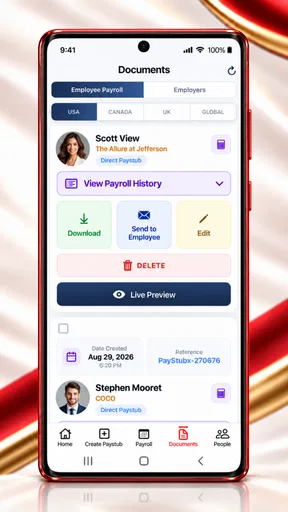
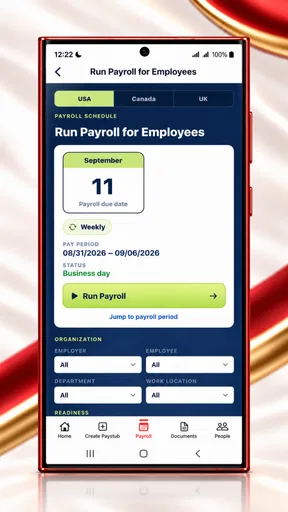
 Analysis by AppCompare
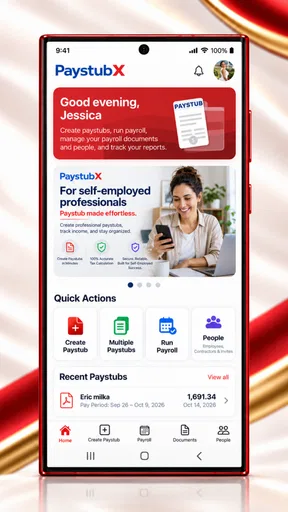
When I need to turn payroll information into something a person can actually read, I care less about flashy presentation and more about whether the result is clear, consistent, and easy to check. That is the main reason I find Paystub Generator: Paycheck interesting. It is a finance app from Paystubx built around creating payslips and paycheck stubs, with a payroll tax calculator included in the same workflow.
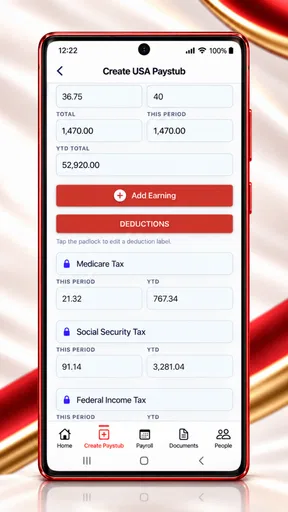
In my experience, its most useful capability is not simply producing a document. It is bringing earnings, deductions, and estimated taxes into one place so that a worker, contractor, or small business owner can review the numbers before using the finished stub. That makes it more practical than a basic document template, although it also means the quality of the result depends heavily on the information entered.
Turning payroll figures into a usable paycheck stub
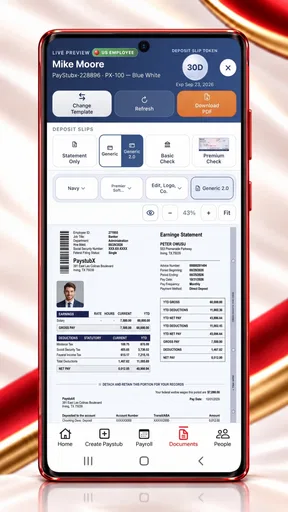
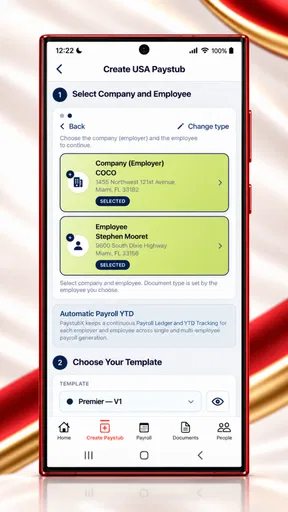
The app’s central idea is straightforward: enter the relevant pay information, work through the payroll calculation, and use the resulting details to create a payslip. I see this as a helpful middle ground between writing a stub manually and adopting a full payroll platform designed for a larger organization.
A manual template may look polished, but it usually leaves the difficult part to the user. You still have to work out gross pay, deductions, and taxes separately, then make sure every figure appears in the right place. The payroll tax calculator changes that process by giving the app a role in the calculation stage rather than acting only as a blank form.
That distinction matters in everyday use. If I am preparing a record for a recent pay period, I can think through the payment as a set of figures instead of trying to format a document first. Gross earnings come before the deductions, and the final take-home amount can then be reviewed as a result of those entries. This encourages a more sensible order of work and makes mistakes easier to notice.
I would not treat the calculator as a replacement for professional payroll advice in complicated situations. Tax treatment can depend on location, employment status, benefits, exemptions, and other details. The app is more convincing when used for a clear, ordinary payroll scenario than when someone expects it to resolve every unusual tax question automatically.
That is also where the app’s value is easy to misunderstand. A generated stub can look official and complete while still reflecting incorrect input. I recommend checking the pay period, earnings type, deduction entries, and final totals before relying on it. The document is only as dependable as the payroll assumptions behind it.
Worth Reading Before You Choose

EA SPORTS FC Mobile 26 Is a Bigger Football Game, but It Takes Time

Flipboard Shows What News Apps Must Do Beyond the Feed

Switching to Android Auto Means Rethinking Your Driving Routine

Google Calendar Makes a Crowded Week Easier to Manage

Ludo King Makes the Most of the Minutes Between Plans

Baby Panda World Brings Quick Play to Modern Phones, but Its Game Library Feels Busy
What the calculator changes in the workflow
The calculator makes the app more useful for people who need a quick estimate before preparing a record. For example, if a worker wants to understand why the net amount differs from the gross amount, seeing the deductions in the same process is more informative than copying figures into a decorative template.
It can also help a small operator keep a consistent routine. Instead of creating one stub from a spreadsheet and another from a different template, the user can follow the same general path each time. I find that consistency is a quiet advantage: it reduces the chance of forgetting a field simply because the layout changed.
One practical tip is to prepare the source information before opening the app. Have the pay dates, gross amount, and intended deductions in front of you, and decide whether the result is for personal record-keeping, a rental application, a loan discussion, or an internal payroll file. This avoids entering half-remembered numbers and then mistaking a neat-looking result for a checked one.
Another useful habit is to compare the calculated take-home amount with the amount that actually reached the employee. If there is a difference, do not immediately assume the app is wrong. First check whether benefits, reimbursements, advances, or other adjustments were included outside the basic calculation. This comparison turns the app into a review tool rather than a one-click document maker.
A realistic everyday use case
Imagine a small business owner who pays one or two people regularly but does not need a full payroll suite. At the end of a pay period, the owner enters the earnings information, reviews the tax calculation, and creates a paycheck stub for the employee’s records. The employee can then use that record when organizing personal finances or explaining income during an application.
In that situation, the app’s focused design makes sense. The owner is not trying to manage a large staff, automate every payroll event, or build an accounting system. The immediate need is a readable record that connects the payment amount with the deductions. Paystub Generator: Paycheck addresses that narrow task more directly than a general word processor.
A second scenario is a worker who wants to keep personal documentation organized. Someone paid through irregular shifts, changing hours, or several short-term arrangements may need a clear record of what was earned and what was withheld. Creating a stub can make those records easier to review later, especially when bank deposits alone do not explain the breakdown.
There is a trade-off here. Creating a document yourself gives you control, but it also gives you responsibility. If the stub is being requested by a landlord, lender, agency, or employer, I would first confirm that a self-generated document is acceptable. The app can help format and calculate a record; it cannot decide whether another organization considers that record sufficient proof of income.
Where it sits beside the usual alternatives
Compared with a simple spreadsheet, this app is more approachable for someone who wants a guided paycheck-stub workflow rather than a collection of formulas. A spreadsheet may be better for a user who needs custom calculations, historical analysis, or a complete payroll ledger, but it requires more setup and more confidence in the formulas.
Compared with a word-processing template, the app has a stronger practical purpose because the payroll calculation is part of the experience. A template is useful when the figures are already confirmed and the only task is presentation. This app is more helpful when the user wants to move from payroll inputs to a structured stub without assembling the calculation separately.
Compared with full payroll software, the advantage is focus. A larger service may be the better choice for recurring payroll, employee onboarding, filings, direct deposits, compliance tasks, and long-term records. Paystub Generator: Paycheck is better suited to a narrower need: preparing individual paycheck documentation and checking the associated calculation.
This comparison also explains who should skip it. If you are responsible for a growing company, need automated payroll administration, or want a system that becomes the central source of employee records, I would look at dedicated payroll software instead. The app’s simplicity is useful precisely because it does not try to be an entire business-management platform.
Small details that deserve careful attention
The first detail I would watch is the difference between a calculation and a confirmed payroll result. The app can organize the information you provide, but users should still verify the assumptions behind it. Treating the output as an estimate until it has been checked is a safer approach, particularly when the pay situation includes unusual deductions or changing employment conditions.
The second is record consistency. If you use the app more than once, keep the same naming style and pay-period convention. A stub collection becomes much easier to understand when each document follows a predictable pattern. This is especially useful for self-employed users or small operators who may later need to review several payments together.
The third is privacy at the point of use. Paycheck records naturally contain sensitive financial and personal details. I would avoid creating them casually on a shared device, and I would think carefully before sending a finished document through an unsecured channel. This is not a criticism unique to the app; it is a practical consequence of handling payroll information digitally.
There is also a financial consideration. The app is free to install, but it includes in-app purchases ranging from $1.99 to $199.99 per item. I would check the purchase screen carefully before committing to anything, especially if I only need an occasional stub. A light user may find the free starting point attractive, while someone planning repeated use should understand which parts of the workflow may involve payment.
Compatibility and day-to-day accessibility
The app has an Everyone content rating, which fits its practical finance purpose and makes it approachable for a broad audience. It was released on March 3, 2017, and the current version is 10.0.28. Support begins with Android 5.0, so it remains accessible on many older Android devices rather than requiring a recent phone.
That broad compatibility is useful for someone who has an older spare phone or does not want to replace a device just to prepare a payroll record. At the same time, I would still keep the operating system updated where possible, because financial documents deserve a device that is maintained and protected. Compatibility makes installation easier, but it does not remove the need for sensible security habits.
The app has reached over 100 thousand installs and holds an average rating of 4.0 from around 3 thousand ratings, with 681 written reviews. Those figures suggest that it has found a real audience, while the rating also tells me not to expect a flawless experience for every user. I read that combination as a reason to approach it as a focused utility: useful for the right task, but not necessarily a complete answer to every payroll problem.
Who gets the most from it
I think the strongest audience is made up of individuals and very small businesses that need occasional, readable paycheck documentation. It can also suit someone who is comfortable checking their own figures and wants the convenience of a calculator alongside the stub-building process.
It is less suitable for users who want payroll to happen automatically in the background. If your priority is scheduled payments, extensive employee management, formal tax administration, or a detailed accounting history, a dedicated service will probably save more time in the long run. The app’s focused workflow becomes a limitation when the surrounding payroll operation is complex.
I would also hesitate to recommend it as the only source of truth for a dispute. If an employee questions a payment, the stub should be compared with time records, wage agreements, bank transactions, and any applicable payroll documentation. A generated record is useful evidence of how the figures were presented, but it should be part of a wider record-keeping process.
For occasional personal use, however, the balance is more favorable. The app gives users a practical way to organize gross pay, deductions, and estimated taxes without requiring them to design a form from scratch. Its main strength is the connection between calculation and presentation, and that is exactly what makes it more useful than a blank template.
My final take after using the focused workflow
Paystub Generator: Paycheck is a sensible finance utility when the goal is to create a paycheck stub while also reviewing the payroll figures behind it. I like that it treats the calculation as part of the task instead of leaving the user to solve the numbers in one tool and format them in another.
My recommendation comes with a clear condition: use it for straightforward documentation, check every entry, and do not confuse a generated stub with professional payroll compliance. For a freelancer, worker, or tiny business that needs an occasional record, it can be a convenient and accessible choice. For a company with recurring payroll complexity, the usual full-service alternatives are likely to be a better investment.
The best way to use this app is as a careful payroll-record assistant, not as an automatic substitute for judgment. If that matches what you need, its focused calculator-and-stub workflow is genuinely practical. If you need an entire payroll operation, its narrow scope will become apparent quickly.
Pros
- Creates professional-looking pay stubs in just a few minutes.
- Useful templates cover common employee and contractor payment details.
- Calculations can be adjusted for different pay periods and deductions.
- Convenient for freelancers and small businesses needing quick records.
- Digital documents are easy to save
- or share with recipients.
Cons
- Accuracy depends on entering tax
- wage
- and employer information correctly.
- May not support every country’s payroll rules or tax requirements.
- Advanced payroll features may require a paid subscription.
- Generated pay stubs may not replace official payroll software or records.
- Handling sensitive income data raises privacy concerns on personal devices.
FAQs for Paystub Generator: Paycheck
What is Paystub Generator: Paycheck used for?
Paystub Generator: Paycheck is designed to help users create professional-looking paycheck stubs and income documents from a mobile device. It can be useful for employees, freelancers, contractors, landlords, and small business owners who need an organized record of earnings. Before using a generated document for official purposes, check whether it meets the requirements of the requesting employer, lender, agency, or institution.
Is Paystub Generator: Paycheck free to download and use?
The application may be available to download at no initial cost, but some templates, export options, or advanced tools can require payment or a subscription. Pricing and included features may vary depending on the platform and region. We recommend reviewing the in-app purchase details, trial conditions, renewal terms, and cancellation policy before creating documents or starting any premium plan.
Can I customize the paycheck stubs created with the app?
The app generally provides editable fields and templates so users can enter information such as employer details, employee data, pay dates, earnings, deductions, taxes, and year-to-date totals. Customization options can differ between templates and account types. Carefully review every figure and spelling before exporting, because the app may format the information but cannot verify whether the data you entered is accurate.
Are paycheck documents generated by the app legally valid?
A paycheck stub created with Paystub Generator: Paycheck should be treated as a formatted record, not automatically as proof accepted by every organization. Legal and practical requirements vary by country, state, employer, lender, and government agency. Never use the app to misrepresent income or employment. Confirm in advance whether digitally generated documents are accepted and retain authentic supporting records when required.
Is my personal and financial information safe when using Paystub Generator: Paycheck?
Because creating a paystub can involve sensitive information, including names, addresses, employer details, income, and tax data, privacy should be considered before use. Review the app’s privacy policy, permissions, storage practices, and any information shared with third-party services. Avoid entering unnecessary data, use a secure device, and delete saved documents or drafts when they are no longer needed.


